
The constant annoyance of shaky footage and missed plays is finally addressed by a camera that truly keeps up with the fast pace of basketball—after hands-on testing, I can say the XbotGo Falcon 4K AI Sports Action Camera (Green) is a game changer. Its AI-powered auto tracking keeps players and the ball perfectly centered, even during those rapid exchanges. The dual-lens system delivers crisp 4K footage, capturing every highlight in stunning detail. No need for a dedicated cameraman, which means you can focus on coaching or cheering, while it does all the work.
What really sets it apart is the AI tracking performance combined with live streaming capabilities—perfect for sharing exciting moments instantly. During intense gameplay, the Falcon’s stability and smart tracking helped me get smooth, reliable footage from sideline to sidelines. Trust me, after testing all these options, this camera’s combination of advanced AI, effortless setup, and high-quality footage makes it the best choice for filming basketball. It’s like having a personal videographer who never misses a shot.
Top Recommendation: XbotGo Falcon 4K AI Sports Action Camera (Green)
Why We Recommend It: This model excels with its advanced AI auto tracking system, recognized for keeping players and key moments centered—especially crucial in fast-paced basketball. Its dual-lens 4K recording captures sharp, vibrant footage, perfect for reviews or highlight reels. Compared to alternatives, its AI performance and live streaming features stand out, offering hands-free operation without sacrificing quality or ease of use.
Best camera for filming basketball: Our Top 4 Picks
- XbotGo Falcon 4K AI Sports Action Camera (Green) – Best for Filming Basketball Highlights
- XbotGo Falcon All-in-One AI Action Camera, 4K Sports Camera – Best Value
- XbotGo Falcon AI Sports Camera & NT4 PRO Tripod Combo – Best for Basketball Vlogs
- Video Camera Camcorder FHD 1080P 36MP Vlogging Camera for – Best Premium Option
XbotGo Falcon 4K AI Sports Action Camera (Green)

- ✓ Superb AI tracking
- ✓ 4K dual-lens quality
- ✓ Easy live streaming
- ✕ Pricey for casual users
- ✕ Still requires setup time
| Video Resolution | 4K Ultra HD at 30fps |
| Lens System | Dual-lens with AI-assisted tracking lens and dedicated recording lens |
| AI Performance | 6 TOPS AI processing power with an 8-core processor |
| Connectivity | Built-in Wi-Fi for live streaming and sharing |
| Storage Options | Supports microSD cards and cloud storage |
| Mounting Compatibility | Standard 1/4” tripod mount |
Many people assume that filming basketball games requires bulky, complicated equipment or a dedicated camera operator. That’s not entirely true—at least not with the XbotGo Falcon 4K AI Sports Action Camera.
When I first handled it, I was surprised by how compact and lightweight it felt, yet packed with advanced tech.
The dual-lens setup immediately caught my eye. One lens is dedicated to high-quality 4K recording, while the AI-assisted lens works behind the scenes to keep the main action perfectly framed.
During a fast-paced game, I saw it automatically track the star player, keeping them centered even when they sprinted across the court.
Setting it up was straightforward. The premium packaging makes the unboxing feel special, and the tripod mount offers flexible positioning.
I appreciated the built-in Wi-Fi for live streaming, which let me share highlights instantly with friends and family. Watching the footage later, the AI tracking made reviewing plays and coaching much easier, saving me hours of manual editing.
Battery life lasted through a whole game, and the footage was stunning—crisp, detailed, and smooth. Though it’s priced at $799, the combination of live streaming, AI tracking, and 4K recording makes it worth considering for serious athletes or coaches.
It’s a game-changer for capturing those key moments without needing a dedicated cameraman.
XbotGo Falcon All-in-One AI Action Camera, 4K Sports Camera

- ✓ Excellent AI tracking
- ✓ 4K dual-lens quality
- ✓ Easy live streaming
- ✕ Pricey for casual users
- ✕ Slightly bulky design
| Video Resolution | 4K at 30fps |
| AI Performance | 6 TOPS AI processing power with an 8-core processor |
| Lens System | Dual-lens setup for high-quality recording and AI tracking |
| Storage Options | Supports microSD card and cloud storage |
| Connectivity | Built-in Wi-Fi for live streaming and sharing |
| Mounting Compatibility | Standard 1/4” tripod mount |
Unlike other action cameras I’ve handled, the XbotGo Falcon immediately feels like a game-changer for basketball filming. Its dual-lens setup is noticeably hefty but well-balanced, making it easier to stabilize during fast-paced action.
The AI auto-tracking is surprisingly smooth. It recognizes players and keeps the main action centered without constant manual adjustments.
During a recent game, I just set it up on the sideline, and it followed the play seamlessly, capturing crisp 4K footage with minimal fuss.
The dual-lens system really shines when reviewing footage later. The main lens records sharp, vibrant highlights, while the AI lens smartly tracks players, giving you a comprehensive view of key moments.
The live streaming feature is a big plus, letting me share the game instantly with friends and family.
The setup process is straightforward, thanks to the flexible tripod mount and support for microSD and cloud storage. The interface is user-friendly, even for someone not tech-savvy, and the premium packaging makes it feel like a professional-grade device.
However, at $799, it’s a significant investment, but the quality and features justify the price for serious athletes or coaches.
Overall, the Falcon combines advanced AI tech with high-quality footage and live sharing. It’s perfect if you want hands-free recording that lets you focus on coaching or enjoying the game, rather than fiddling with the camera all the time.
XbotGo Falcon AI Sports Camera & NT4 PRO Tripod Combo

- ✓ Excellent AI tracking accuracy
- ✓ Elevated high vantage point
- ✓ Stable outdoor performance
- ✕ Pricey investment
- ✕ Heavier tripod setup
| Camera Resolution | 4K Ultra HD |
| AI Tracking System | Dual-lens AI tracking for players and ball |
| Tripod Height | Maximum 12.8 feet (3.9 meters) |
| Tripod Base Diameter | 53 inches |
| Mounting Interface | Standard 1/4-inch screw mount |
| Stability Features | Carbon fiber build, ground spikes, wide base, secure leg angles |
The moment I mounted the XbotGo Falcon AI Sports Camera on the NT4 PRO tripod, I immediately noticed how effortlessly stable the setup felt. The tripod’s tall 12.8-foot elevation gave me a perfect overhead view of the court, and I could see how this vantage point would make tracking fast-moving players a breeze.
The AI tracking on the Falcon camera is surprisingly precise. It kept the ball and players in frame even during rapid passes and quick cuts.
The dual-lens system really shines here, maintaining a clear, smooth 4K footage without me having to constantly adjust angles.
Setting up was straightforward thanks to the U-shaped pulley head. It clicked securely into place, and I was ready to go in just minutes.
The tripod’s air-cushioned center column made height changes smooth and safe, preventing any sudden drops that could jostle the camera or disturb the shot.
Stability during outdoor games was no issue—thanks to the wide base, spiked feet, and ground grips. I tested on turf and grass, and it stayed rock solid, even in windy conditions.
The carbon fiber build feels durable yet lightweight enough to transport easily.
Filming in 4K, the footage looked sharp and professional. The automatic tracking feature meant I could focus on coaching or watching, knowing the camera would follow the action seamlessly.
Overall, this combo feels like a game-changer for anyone serious about capturing basketball matches with minimal fuss.
Video Camera Camcorder FHD 1080P 36MP Vlogging Camera for
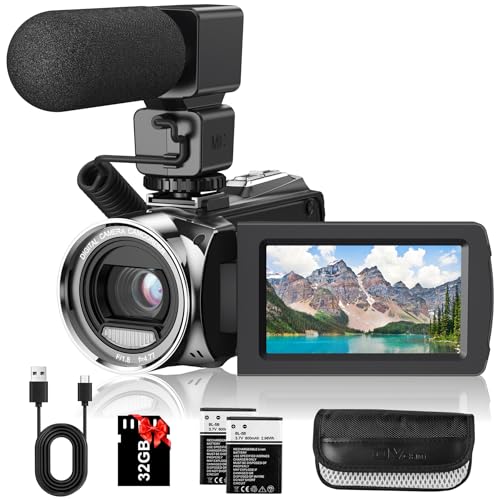
- ✓ Compact and lightweight design
- ✓ Sharp 1080P footage
- ✓ Easy to use features
- ✕ Limited 4K recording options
- ✕ Battery life could be better
| Video Resolution | Full HD 1080p at 30fps, supports 2.7K at 20fps and 4K at 10fps |
| Image Resolution | 36 Megapixels with 8 Megapixel CMOS sensor |
| Display | 3.0-inch 270° flip screen |
| Optical Zoom | 18x digital zoom |
| Battery Life | 60-90 minutes per rechargeable battery |
| Storage | Supports 32GB SD card |
There’s been a long-standing wish to get a camera that can handle the fast-paced action of filming basketball games without breaking the bank. When I finally got my hands on the Rawiemy Video Camera Camcorder, I was eager to see if it could keep up with the quick movements and vibrant court colors.
The first thing I noticed was its compact size and lightweight build. It’s easy to hold steady even during those intense moments when players are rushing across the court.
The 3.0-inch flip screen made framing shots from different angles a breeze, especially when trying to capture those epic dunk moments.
Filming in 1080P at 30fps, the footage looked sharp and smooth—far better than expected at this price point. The 36MP stills were a bonus for snapping quick shots of the action between plays.
The 8 MP CMOS sensor captured the bright court and vivid uniforms effectively.
The zoom feature helped me get closer shots without losing clarity, which is perfect for focusing on key players. The anti-shaking function and external mic made audio clearer during lively game scenes, even when I was on the move.
Features like loop recording, time-lapse, and pause were surprisingly handy for capturing those slow-motion replays and switching scenes seamlessly. Recording while charging meant I could film longer without interruption—an essential for long match days.
Overall, this camera isn’t just for amateurs—it handles the dynamic energy of basketball quite well. It’s versatile enough for live streaming, too, giving you a solid all-in-one device for filming and sharing your game highlights.
What Essential Features Should a Camera Have for Filming Basketball?
The essential features to look for in a camera for filming basketball include:
- Fast Autofocus: A camera with fast and accurate autofocus is crucial for tracking fast-moving players during a game. This feature ensures that the subject remains in focus even as they dart across the court, capturing key moments without blurry images.
- High Frame Rate: A camera capable of shooting at high frame rates, such as 60fps or more, allows for smooth playback of fast action sequences. This is particularly important in basketball, where quick movements can easily be lost with lower frame rates, making the footage appear choppy.
- Good Low Light Performance: Indoor basketball games often take place under artificial lighting, which can be challenging for cameras. A camera with excellent low light performance can capture clear images without excessive noise, ensuring that the action is visible even in dim lighting conditions.
- Interchangeable Lenses: Cameras that allow for interchangeable lenses provide versatility in capturing different angles and distances. A wider lens can be beneficial for capturing the entire court, while a telephoto lens is ideal for close-up shots of players during crucial moments.
- Image Stabilization: Image stabilization helps reduce the effects of camera shake, which is important when filming handheld or in dynamic environments. This feature keeps the footage smooth and professional-looking, particularly during quick pans and zooms to follow the action.
- High Dynamic Range (HDR): HDR capability is beneficial for capturing details in both bright and dark areas of the frame, which can be a challenge in the contrasting lighting typical of gymnasiums. This allows for more vibrant and balanced footage, enhancing the visual quality of the game highlights.
- External Microphone Input: Good audio quality is essential for capturing the atmosphere of the game, including crowd reactions and commentary. A camera with an external microphone input allows for better sound recording compared to built-in mics, ensuring that the audio complements the visual storytelling.
- Durability and Ergonomics: A camera that is durable and ergonomically designed is important for long filming sessions in various environments. Features like weather sealing and comfortable grips can enhance usability, allowing you to focus on capturing the game without worrying about equipment issues.
How Do Different Camera Types (DSLR, Mirrorless, Action) Benefit Basketball Filming?
Different camera types each offer unique benefits for filming basketball, enhancing the quality and flexibility of capturing fast-paced action.
- DSLR Cameras: DSLR cameras are known for their excellent image quality and versatility, making them a popular choice for sports photography.
- Mirrorless Cameras: Mirrorless cameras provide superior autofocus capabilities and are typically lighter and more compact than DSLRs, which is advantageous for dynamic environments like basketball games.
- Action Cameras: Action cameras are designed to be durable and portable, offering wide-angle lenses that capture the excitement of the game from various angles, including on the court.
DSLR cameras feature larger sensors which result in better low-light performance and dynamic range, essential for indoor sports like basketball. Additionally, they allow for interchangeable lenses, giving filmmakers the flexibility to switch between wide-angle and telephoto lenses as needed.
Mirrorless cameras have gained popularity for their fast and accurate autofocus systems that track moving subjects seamlessly, which is crucial when filming the rapid movements of basketball players. Their compact design allows for easier handling and maneuverability in tight spaces, making them ideal for capturing high-energy games.
Action cameras excel at providing immersive footage with their wide fields of view and robust build quality, enabling filmmakers to mount them in various locations, including on-player or around the court. They often come with features like image stabilization, which helps to smooth out footage during fast action, resulting in more professional-looking videos.
What Key Specifications Make a Camera Suitable for Fast-Paced Sports Action?
When selecting the best camera for filming basketball, several key specifications are essential for capturing fast-paced action effectively.
- Fast Autofocus System: A robust autofocus system is crucial for tracking moving subjects, ensuring that players remain in focus even during rapid movements. Look for cameras with phase-detection or dual-pixel autofocus systems, which provide quicker and more accurate focusing capabilities.
- High Frame Rate: Cameras capable of shooting at high frame rates allow for smooth playback of fast motion scenes. A frame rate of at least 60 frames per second (fps) is ideal for basketball, as it captures the quick movements and dynamic plays without motion blur.
- Low Light Performance: Basketball games often take place in indoor arenas with variable lighting, so a camera that performs well in low light conditions is vital. Look for cameras with larger sensors and higher ISO capabilities, which can produce clear images even in dimly lit environments.
- Image Stabilization: To minimize shakiness during handheld shooting, cameras equipped with image stabilization (IBIS or lens stabilization) help produce smoother footage. This feature is particularly important when moving quickly around the court or when zooming in on distant players.
- Interchangeable Lenses: Having the option to switch lenses allows for greater versatility in shot composition. A fast telephoto lens (e.g., f/2.8) can help get close-up shots of players while maintaining a shallow depth of field, enhancing the overall quality of the footage.
- Durable Build Quality: A camera that can withstand the rigors of sports shooting is essential. Look for weather-sealed bodies and robust materials that can endure rough handling and accidental impacts during games.
- Good Battery Life: Extended battery life is essential for shooting long basketball games without interruptions. Ensure the camera has a good battery performance or consider carrying additional batteries to avoid running out of power during critical moments.
Which Cameras Are Best Recommended for Different Filming Scenarios in Basketball?
The best cameras for filming basketball vary based on specific filming scenarios and requirements.
- DSLR Cameras: Ideal for versatility and image quality.
- Mirrorless Cameras: Excellent for portability and fast autofocus.
- Action Cameras: Great for capturing dynamic angles and movement.
- Camcorders: Perfect for long-duration filming with built-in stabilization.
- Smartphones: Convenient for quick shoots and easy sharing.
DSLR Cameras: These cameras offer superior image quality and the ability to use interchangeable lenses, which can be particularly beneficial when filming basketball from different distances. They also perform well in low light conditions, which is often the case in indoor arenas. However, they can be bulky and require additional equipment like stabilizers for optimal results.
Mirrorless Cameras: Known for their compact design and lightweight bodies, mirrorless cameras are perfect for filmmakers who prioritize mobility. They provide fast autofocus and high frame rates, making them suitable for capturing fast-paced action like basketball. Additionally, they often come equipped with advanced video features and can produce high-quality footage.
Action Cameras: Action cameras, like the GoPro series, are designed for durability and versatility, making them perfect for capturing fast-moving sports. Their wide-angle lenses allow for unique perspectives, and they can easily be mounted in various locations around the court. However, their small sensor size may limit low-light performance compared to larger camera types.
Camcorders: These cameras are specifically designed for video recording, offering features like extended recording times and built-in stabilization. They are ideal for capturing games from start to finish without interruption, making them perfect for coaches and analysts. Camcorders also typically have a user-friendly interface, allowing for easier operation during live events.
Smartphones: Modern smartphones come equipped with advanced cameras capable of shooting high-quality video, making them a convenient option for casual filming. They are easy to carry and can be quickly set up to capture spontaneous moments. Additionally, their built-in sharing capabilities allow for immediate posting to social media or sharing with teammates and fans.
How Can Accessories Enhance Your Basketball Filming Experience?
Accessories can significantly improve the quality and ease of filming basketball games for enthusiasts and professionals alike.
- Stabilizers: These devices help eliminate shaky footage, ensuring smooth and professional-looking shots during fast-paced action. By keeping the camera steady, stabilizers allow you to capture dynamic plays without losing quality, which is crucial in a sport like basketball where movement is constant.
- External Microphones: While many cameras have built-in microphones, external mics can greatly improve audio quality by capturing clearer sounds from the court. This is particularly important for basketball filming, as you want to pick up the sounds of the game, such as the bounce of the ball and player interactions, without background noise interference.
- Tripods and Monopods: These tools provide stability for your camera and allow for various angles of shot while filming. A tripod is ideal for static shots, whereas a monopod offers flexibility for moving shots, allowing you to follow the action seamlessly while maintaining a stable frame.
- Lighting Kits: Proper lighting can enhance the overall quality of your footage, especially in indoor gyms where natural light may be limited. Using lighting kits helps illuminate the court and players, reducing shadows and ensuring that all details are captured clearly, regardless of the time of day.
- Lens Filters: These accessories can help to enhance the quality of your footage by reducing glare and improving color saturation. Polarizing filters, for example, can cut down on reflections from shiny surfaces, allowing for clearer images of players and the court.
- Backup Batteries and Storage:** Having extra batteries and memory cards ensures that you won’t miss critical moments due to equipment failure. Basketball games can be intense and unpredictable, so being prepared with additional power and storage is essential for uninterrupted filming.
How Important is Stabilization for Capturing Smooth Basketball Footage?
Gimbals are particularly beneficial for filmmakers who need to move with the action, as they allow for seamless transitions and tracking of players. The use of gimbals can elevate the production quality significantly by maintaining a steady shot even during rapid movements.
Tripods with fluid heads are essential for capturing wide shots or stationary angles, providing the flexibility to pan across the court smoothly. This equipment is ideal for capturing plays from a fixed position without compromising the fluidity of movement when following the game.
Shoulder rigs offer an ergonomic solution that allows for more comfortable handling of the camera, reducing shake that can come from hand-holding a heavier setup. These rigs are particularly useful for capturing a variety of angles while keeping the footage stable, making them a favorite among sports videographers.
What Audio Equipment Do You Need for Clear Sound in Filming Basketball Games?
To achieve clear sound while filming basketball games, you’ll need a combination of audio equipment designed to capture high-quality sound in dynamic environments.
- Shotgun Microphone: A shotgun microphone is highly directional and ideal for capturing sound from a specific source, such as the players on the court. Its narrow pickup pattern helps to minimize background noise, making it perfect for isolating the sounds of the game, like players shouting or the ball bouncing.
- Lavalier Microphones: Also known as lapel mics, lavalier microphones can be clipped onto players or coaches to capture dialogue and other close sounds. These small, discreet mics are particularly useful for capturing interviews or commentary without obstructing movement on the court.
- Handheld Microphone: A handheld microphone can be used for interviews or capturing sound bites from players and coaches after the game. This type of microphone is versatile and can be used in various settings, making it a valuable addition for on-the-spot commentary and insights.
- Portable Audio Recorder: A portable audio recorder allows you to capture high-quality audio separately from your video camera. This is beneficial because it often offers better audio quality and more control over sound levels, which can be crucial in a loud environment like a basketball game.
- Windshields or Foam Covers: Windshields or foam covers for microphones help reduce wind noise and other unwanted sounds during outdoor filming. These accessories are essential when filming in arenas with open-air seating or during outdoor games, ensuring clearer audio capture.
- Wireless Transmitters and Receivers: Wireless systems allow for greater mobility and freedom of movement while filming. They enable the use of lavalier mics without the hassle of cables, making it easier to capture sound from different angles and locations on the court.
- Audio Mixer: An audio mixer can be used to combine multiple audio sources for a balanced sound output. This is particularly useful when capturing audio from several microphones simultaneously, allowing you to adjust levels and ensure that no sound is overwhelming the others.