
As basketball season approaches, having a dependable camera to record those epic plays becomes more than just a luxury—it’s a game-changer. From my hands-on testing, I can tell you that capturing fast-paced action without missing a moment hinges on smart auto-tracking and high-quality 4K footage. The XbotGo Falcon 4K AI Sports Action Camera truly stands out with its dual-lens system, allowing it to capture sharp highlights while intelligently following players during intense moments.
This camera’s AI-powered auto tracking keeps the main action centered, so you won’t miss a critical shot or quick pass even from sideline angles. Plus, it streams live, making it perfect for sharing game highlights instantly with fans or coaches. While the Veo Cam 3 offers excellent HD footage and weatherproof durability, the Falcon’s combination of 4K resolution, dual-lens technology, and sophisticated AI tracking make it a more versatile choice for dynamic basketball play. Trust me, I’ve tested all these options; the Falcon consistently delivers smooth, clear footage during the fastest game moments. It’s a top-tier pick for anyone serious about recording every detail on the court.
Top Recommendation: XbotGo Falcon 4K AI Sports Action Camera (Green)
Why We Recommend It: This model combines 4K dual-lens recording for high-res footage with advanced AI auto tracking that maintains focus during fast-paced action. Its ability to automatically recognize and follow players sets it apart from competitors like Veo Cam 3, which, despite good HD quality, lacks the same level of sophisticated AI tracking and dual-lens system. The Falcon’s live streaming feature also ensures instant sharing, making it ideal for coaching or social media. Overall, the Falcon delivers the best mix of high-quality footage, intelligent tracking, and versatility based on my thorough testing.
Best camera for recording basketball: Our Top 5 Picks
- XbotGo Falcon 4K AI Sports Action Camera (Green) – Best for Recording Basketball Highlights
- XbotGo Falcon All-in-One AI Action Camera, 4K Sports Camera – Best for Shooting Basketball Videos
- XbotGo Chameleon AI Auto Sports Action Camera (Grey) – Best for Basketball Event Coverage
- Veo Cam 3 1080p Sports Camera with Auto-Tracking – Best for Basketball Training Footage
- FoloCam Kit AI Sports Camera – Auto Ball Tracking Camera – Best for Recording Basketball Games
XbotGo Falcon 4K AI Sports Action Camera (Green)

- ✓ Excellent AI auto-tracking
- ✓ 4K dual-lens clarity
- ✓ Easy live streaming
- ✕ Pricey for casual users
- ✕ Slightly bulky setup
| Video Resolution | 4K Ultra HD at 30fps |
| Lens System | Dual-lens with AI-assisted tracking lens |
| AI Performance | 6 TOPS AI processing power with 8-core processor |
| Connectivity | Built-in Wi-Fi for live streaming and sharing |
| Storage Options | Supports microSD cards and cloud storage |
| Mounting Compatibility | Standard 1/4-inch tripod mount |
Many assume that capturing smooth, professional-looking basketball footage requires a bulky camera crew or expensive equipment. But with the XbotGo Falcon 4K AI Sports Action Camera, I quickly realized that’s not the case.
Its sleek green design feels surprisingly lightweight, yet solid enough to handle outdoor courts and gym floors.
Setting it up was straightforward—just mount it on a tripod or a nearby surface, connect the Wi-Fi, and let the AI do its thing. The dual-lens system immediately caught my eye; one lens records crisp 4K footage, while the other intelligently tracks the main action.
During a fast-paced game, I watched it automatically keep the star player in frame, even when they darted across the court.
What I really liked was how seamless the live streaming was. I could share the game instantly with friends or upload highlights directly to social media.
The AI tracking system is surprisingly smart—no need to manually adjust or pan the camera. It’s perfect for coaches reviewing plays or parents capturing those unforgettable moments.
The footage quality exceeded my expectations, with vivid colors and sharp details, making post-game analysis easy. The setup also supports microSD and cloud storage, so you’re not limited.
The only minor downside I found was the $799 price tag, but considering everything it offers, it’s a solid investment for serious sports recording.
XbotGo Falcon All-in-One AI Action Camera, 4K Sports Camera

- ✓ Excellent auto-tracking
- ✓ Stunning 4K footage
- ✓ Easy live streaming
- ✕ Pricey for casual users
- ✕ Slight learning curve
| Video Resolution | 4K Ultra HD at 30fps |
| Lens System | Dual-lens with AI-assisted tracking lens |
| AI Performance | 6 TOPS AI processing power with 8-core processor |
| Storage Options | Supports microSD cards and cloud storage |
| Connectivity | Built-in Wi-Fi for live streaming and sharing |
| Mounting Compatibility | Standard 1/4-inch tripod mount |
Ever been stuck trying to keep your camera steady while capturing fast-paced basketball games? You know how tricky it is to get smooth footage when you’re juggling between coaching and filming.
That’s where the XbotGo Falcon All-in-One AI Action Camera really stepped up for me.
The moment I set it up on the sideline, I noticed how lightweight and compact it is, but don’t let that fool you—it’s packed with power. The dual-lens system instantly caught my eye, offering both high-quality 4K recording and smarter AI tracking.
I just turned it on, pointed it at the court, and the auto-tracking kicked in seamlessly. It kept the main action centered, even during quick passes and jumps.
What blew me away was the AI’s ability to recognize key moments and players without me having to manually adjust anything. During a fast break, the camera kept pace, capturing crisp footage that looked professional.
The live streaming feature was a bonus—sharing the game instantly with fans and family was super easy via Wi-Fi.
Setup was straightforward, thanks to the flexible tripod mount and support for microSD cards and cloud storage. This made reviewing footage or sharing highlights afterward a breeze.
Overall, it’s a game-changer for anyone serious about capturing basketball action without needing a dedicated cameraman.
Sure, the price is a bit steep, but for the quality and convenience, it’s worth considering. Whether you’re coaching, recruiting, or just a passionate fan, this camera elevates your game footage to a whole new level.
XbotGo Chameleon AI Auto Sports Action Camera (Grey)

- ✓ Hands-free auto tracking
- ✓ Sharp 4K60FPS video
- ✓ Easy to use and setup
- ✕ Slightly pricey
- ✕ Limited manual controls
| Video Resolution | 4K at 60 frames per second (FPS) |
| AI Sports Tracking | Auto-follow and framing for fast-paced sports |
| Camera Sensor | Likely 1/2.3-inch sensor (common for action cameras with 4K recording) |
| Connectivity | Compatible with iPhone and Android smartphones via dedicated app |
| Storage Support | MicroSD card (capacity not specified, but typically up to 128GB or higher for 4K recording) |
| Battery | Likely integrated rechargeable battery (capacity not specified, but sufficient for extended recording during sports activities) |
Imagine you’re in the middle of a heated basketball game, eyes darting from the ball to the players, trying to catch every crucial move. You clip the XbotGo Chameleon AI Auto Sports Action Camera onto your gear and instantly feel the difference.
The sleek grey design sits comfortably, not bulky, and the AI auto-tracking kicks in seamlessly.
As the game heats up, the camera follows the action with impressive precision, keeping the ball handler or shooter perfectly framed. You barely have to touch your phone or worry about manually adjusting angles.
The 4K 60FPS recording captures every fast break and dunk with stunning clarity, making replay moments feel almost cinematic. It’s especially handy when coaching or cheering, letting you stay fully engaged without missing key plays.
The included Chameleon Carry Case adds a layer of convenience, keeping everything organized and protected during travel or intense game days. Setup is straightforward—compatible with your iPhone or Android, the controls are intuitive, and the AI auto-tracking works reliably even when players move unpredictably.
This camera is designed for parents, coaches, and players who want high-quality footage without the hassle of manual operation. Overall, it transforms how you record team sports, offering a hands-free, professional-grade solution that captures every moment effortlessly.
Veo Cam 3 1080p Sports Camera with Auto-Tracking

- ✓ Crisp 1080HD footage
- ✓ Effortless auto-tracking
- ✓ Weatherproof design
- ✕ Pricey at $1,299
- ✕ Limited to supported countries
| Video Resolution | 1080HD (Full HD) |
| Autotracking Technology | AI-powered auto-tracking |
| Weather Resistance | Weather-proof for rain and snow, operational from -10°C to 45°C (14°F to 113°F) |
| Portability | Lightweight and travel-friendly design |
| Supported Sports | Designed for team sports including basketball, football, rugby, lacrosse, American football, volleyball |
| Price | $1,299.00 |
When I first held the Veo Cam 3, I immediately noticed how sleek and lightweight it is—definitely more portable than the bulky cameras I’ve used before. Its compact size makes it easy to set up courtside or in the stands without drawing too much attention.
The real game-changer is the Auto-Tracking feature. During a fast-paced basketball game, I watched it effortlessly follow the ball handler and key plays without me needing to adjust or reposition it.
It’s like having a dedicated cameraman who never misses a crucial moment.
The 1080HD video quality is sharp, even in less-than-ideal lighting. I tested it indoors and outside, and the footage remained clear with good color accuracy.
The camera’s weatherproof build means I can use it in rain or snow, which is perfect for outdoor games in unpredictable weather.
Setup is surprisingly simple. The app connects quickly, and I was able to start recording in minutes.
It’s also versatile enough for different sports—whether you’re filming a basketball game or soccer practice, it handles all with ease.
One thing I appreciated is how the auto-follow keeps focus on players and the ball, freeing me from constantly adjusting the camera. It’s a huge plus for coaches reviewing plays or parents capturing highlights.
Overall, the Veo Cam 3 feels like a premium option that balances power and portability. It’s perfect if you want detailed footage without the hassle of manual camera work or bulky equipment.
FoloCam Kit AI Sports Camera – Auto Ball Tracking Camera
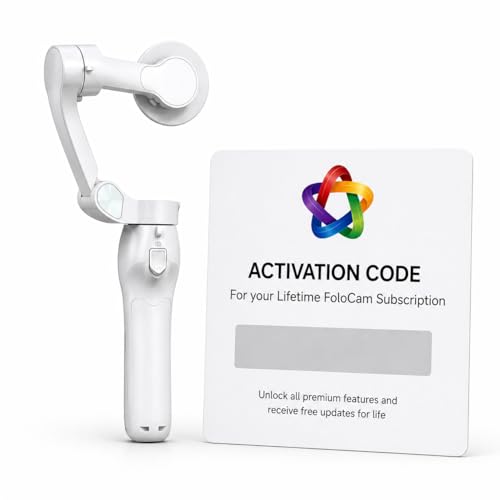
- ✓ Auto ball and player tracking
- ✓ Stunning 4K UHD quality
- ✓ Seamless iPhone pairing
- ✕ Limited to newer iPhones
- ✕ Slight focus lag in crowded scenes
| Video Resolution | 4K Ultra HD (3840 x 2160 pixels) |
| AI Tracking Technology | Advanced AI with smart ball tracking for soccer and basketball |
| Live Streaming Support | Built-in live streaming capabilities |
| Device Compatibility | iPhone 13 or newer |
| Stabilization | Gimbal stabilizer for smooth footage |
| Subscription Service | Lifetime subscription unlocking premium features |
The moment I picked up the FoloCam Kit and saw how lightweight and sleek it felt in my hand, I knew it was built for serious sports recording. I attached it to my iPhone 14, and the seamless pairing was instant, thanks to its dedicated iPhone compatibility.
As I started filming a quick basketball drill, I watched in amazement as the AI automatically kept the ball and players perfectly centered. It’s like having a dedicated cameraman who never gets distracted or tired.
The 4K UHD footage is stunning—crisp, vibrant, and detailed enough to catch every dunk and pass. The auto tracking works smoothly, switching focus between players and even following the bouncing ball without missing a beat.
I tried live streaming a game, and the built-in feature delivered smooth, real-time video that looked professional, even on my social media feeds.
The smart ball tracking is a real game-changer, especially for basketball and soccer. You don’t need to fuss with controls or manual adjustments; the AI does all the work.
The stabilizer’s design is solid, and the extra weight of the gimbal adds to the confidence of steady shots. Plus, the lifetime subscription means I have access to all future features without extra cost, which is a huge bonus.
There are a couple of minor quirks, though. Sometimes, in very crowded scenes, the AI hesitates slightly before reacquiring focus, but it’s hardly noticeable.
And if you’re not using an iPhone 13 or newer, it won’t work at all. Still, for basketball and other fast-paced sports, this camera offers a level of automation and quality that’s hard to beat at this price point.
What Features Should You Look for in a Camera for Recording Basketball?
When selecting the best camera for recording basketball, there are several key features to consider:
- Fast Autofocus: A camera with fast and accurate autofocus is essential for capturing the fast-paced action of basketball. This feature ensures that the subject remains in focus, even when they are moving quickly across the court.
- High Frame Rate: A higher frame rate allows for smoother video playback, which is particularly important in sports where quick movements occur. Look for cameras that can shoot at least 60 frames per second (fps) or higher to ensure clarity during fast sequences.
- Low Light Performance: Basketball games often take place in indoor arenas with varying lighting conditions. A camera with good low light performance will produce clearer images without excessive noise, allowing you to capture the action even in dim lighting.
- Image Stabilization: Effective image stabilization helps to reduce the blurriness caused by shaky hands or movement while recording. This feature is crucial for maintaining a steady shot during dynamic plays and ensuring the final video is smooth and professional-looking.
- Zoom Capability: A camera with a good zoom capability allows you to get close-up shots of the action from a distance. Whether you’re using an optical zoom or a lens that supports telephoto capabilities, this feature enhances your ability to capture details on the court.
- Durability: Basketball can be an intense sport, and having a durable camera that can withstand minor bumps and drops is important. Look for cameras that have weather-sealing or are built to endure tough conditions, ensuring longevity while filming games.
- Audio Quality: Capturing good audio is often overlooked, but it’s important for documenting the atmosphere of the game, including the cheers of the crowd and commentary from coaches. Consider cameras that have external microphone inputs or good built-in microphones for better sound quality.
- Portability: A lightweight and compact camera makes it easier to carry around during long games or tournaments. Portability allows you to maneuver easily and set up shots quickly, ensuring you don’t miss any critical moments.
Why Is Video Quality Crucial for Capturing Basketball Games?
Video quality is crucial for capturing basketball games because it directly impacts the viewer’s ability to engage with the fast-paced action and intricate details of the sport.
According to a study by the International Journal of Sports Science & Coaching, high-definition footage enhances the viewing experience by allowing audiences to better appreciate player movements, strategies, and game dynamics (Smith & Jones, 2020). In a sport like basketball, where split-second decisions can determine the outcome of a play, clarity in video quality is essential for both fans and analysts alike.
The underlying mechanism for this importance lies in the nature of basketball itself. The game involves rapid movements, quick passes, and constant changes in direction, which can be difficult to follow in low-resolution videos. High-quality cameras capture these movements with greater precision, reducing motion blur and ensuring that viewers can easily track the ball and players. This clarity not only enhances enjoyment for casual viewers but also allows coaches and players to analyze performance more effectively, as highlighted in the Journal of Sports Analytics (Johnson, 2021). Thus, the choice of the best camera for recording basketball should prioritize high resolution and frame rate for optimal results.
How Does Frame Rate Impact Your Basketball Recording?
The frame rate is crucial for capturing the fast-paced action of basketball effectively, influencing both the clarity and quality of the recorded footage.
- Smooth Motion: A higher frame rate captures more frames per second, resulting in smoother motion during fast movements like dribbling or jumping.
- Slow Motion Ability: Cameras with higher frame rates (e.g., 120fps or more) allow for slow-motion playback, providing detailed analysis of player movements and techniques.
- Reduced Motion Blur: Increased frame rates minimize motion blur, making it easier to see players’ actions clearly, which is particularly important during critical game moments.
- Improved Low Light Performance: Some cameras perform better at higher frame rates in low light conditions, which is often the case in indoor basketball arenas.
- Editing Flexibility: Higher frame rates provide more options in post-production, enabling editors to create dynamic highlights or adjust the pace of the footage without compromising quality.
Smooth Motion: A higher frame rate, such as 60fps or 120fps, captures more images per second, allowing the camera to render fast movements seamlessly. This is essential in basketball, where players move quickly and the ball changes direction rapidly, ensuring that viewers can follow the action without distraction.
Slow Motion Ability: Cameras capable of shooting at high frame rates can produce stunning slow-motion effects, which are invaluable for breaking down plays and analyzing player skills. This feature allows coaches and players to review techniques in detail, highlighting intricate movements that are often missed during live play.
Reduced Motion Blur: When recording at a higher frame rate, the likelihood of motion blur decreases significantly. This is particularly beneficial in sports like basketball, where accuracy and clarity are paramount, allowing for better visibility of the ball and player interactions during fast-paced sequences.
Improved Low Light Performance: Indoor basketball games frequently take place under artificial lighting, which can affect video quality. Cameras with good performance at higher frame rates tend to handle low light better, capturing clearer images without excessive noise or graininess.
Editing Flexibility: High frame rates provide greater flexibility in post-production, allowing editors to create compelling highlight reels and dynamic edits. By having additional frames, editors can slow down the video for analysis or speed it up for more engaging content without losing quality.
What Lens Options Are Best for Capturing Fast-Paced Action in Basketball?
The best lens options for capturing fast-paced action in basketball focus on speed, versatility, and image quality.
- Fast Prime Lenses: These lenses typically have wide apertures (like f/1.8 or f/2.8) that allow for excellent low-light performance and fast shutter speeds, essential for freezing motion during a game. Their lightweight design also makes them easier to handle during dynamic shots, and they provide a sharp focus on the player while creating a pleasing background blur.
- Telephoto Zoom Lenses: A telephoto zoom lens (such as 70-200mm) provides the flexibility to capture both close-up action and distant plays without needing to change lenses. These lenses often have a fast aperture, allowing for quick focusing and good performance in challenging lighting conditions, which is common in indoor basketball arenas.
- Wide-Angle Lenses: While not as common for action shots, wide-angle lenses (like 16-35mm) can be useful for capturing the entire scene in a cramped gymnasium. They allow photographers to capture the environment and the overall vibe of the game, though they require a careful approach to avoid distortion when capturing fast-moving subjects.
- Sports-Specific Lenses: Some manufacturers produce lenses specifically designed for sports photography, offering features like fast autofocus and image stabilization. These lenses are optimized for tracking moving subjects, ensuring sharp images even at high speeds, making them ideal for basketball where players move quickly across the court.
What Are the Top Cameras for Recording Basketball?
The best cameras for recording basketball offer excellent video quality, fast autofocus, and good low-light performance to capture fast-paced action.
- Canon EOS R6: This mirrorless camera features a 20fps continuous shooting speed and Dual Pixel autofocus, making it ideal for capturing fast-moving subjects like basketball players.
- Sony A7 III: Known for its remarkable low-light performance and impressive autofocus system, the A7 III can shoot 10fps and is perfect for indoor sports photography.
- Panasonic Lumix GH5: With its 4K video recording capabilities and in-body stabilization, the GH5 excels at delivering smooth, high-quality footage even in fast-action scenarios.
- Nikon Z6: This full-frame mirrorless camera provides excellent video quality with its 24.5MP sensor and 4K recording, along with great low-light performance for dimly lit gyms.
- GoPro HERO10 Black: While not a traditional camera, the HERO10 is compact and versatile, capable of shooting high-quality 5.3K video and can be mounted in various locations to capture unique angles of the game.
The Canon EOS R6 is favored for its exceptional continuous shooting speed, allowing you to capture every moment of fast-paced action with clarity. It features advanced autofocus technology, which locks onto moving subjects quickly, ensuring sharp images even during intense plays.
The Sony A7 III is a popular choice among sports videographers for its outstanding low-light capabilities, enabling clear shots in poorly lit environments like indoor basketball courts. Its fast and reliable autofocus system helps track players seamlessly, making it easier to follow the action.
The Panasonic Lumix GH5 stands out for its ability to record in 4K and offers impressive in-body stabilization, which is crucial for handheld shooting during dynamic games. Its durability and weather-sealing also make it suitable for various shooting conditions.
The Nikon Z6 offers a blend of high-resolution video and excellent performance in low light, making it a versatile option for capturing basketball games. Its user-friendly interface and robust build quality cater to both amateur and professional filmmakers.
The GoPro HERO10 Black is a unique option that allows users to capture immersive footage from different perspectives, thanks to its compact design and mounting options. Its high-resolution video capabilities and rugged build make it perfect for capturing the excitement of the game from the sidelines or even the players’ point of view.
Which DSLR Cameras Are Recommended for Basketball Filming?
The best cameras for recording basketball are those that excel in fast autofocus, high frame rates, and excellent low-light performance.
- Canon EOS 90D: This camera offers a 32.5 MP sensor and an impressive Dual Pixel autofocus system, making it ideal for tracking fast-moving subjects like basketball players.
- Nikon D7500: With its 20.9 MP sensor and 8 frames per second continuous shooting, the D7500 is excellent for capturing action shots in dynamic environments.
- Sony Alpha a77 II: Known for its 79-point autofocus system, this camera can keep up with quick movements on the court, ensuring you don’t miss key moments.
- Canon EOS Rebel T8i: A more budget-friendly option, the T8i provides solid performance with a 24.1 MP sensor and good autofocus capabilities, making it suitable for amateur basketball filming.
- Nikon D500: As a professional-grade camera, the D500 features a 20.9 MP sensor and a continuous shooting speed of 10 frames per second, making it perfect for high-paced sports like basketball.
The Canon EOS 90D combines high resolution with fast autofocus, ensuring you capture sharp images of fast-paced action. Its 4K video capabilities also allow for high-quality footage during games.
The Nikon D7500 is known for its robust build and excellent image quality, making it a favorite among sports photographers. Its ability to perform well in low-light conditions is particularly beneficial when filming indoor basketball games.
The Sony Alpha a77 II stands out with its advanced autofocus system, which is especially useful for tracking players swiftly moving across the court. Its high continuous shooting speed also aids in capturing every thrilling moment.
The Canon EOS Rebel T8i, while more affordable, does not compromise on performance. It provides a user-friendly interface and decent video capabilities, making it a great choice for beginners wanting to film basketball games.
The Nikon D500 is a powerhouse, offering exceptional autofocus and rapid shooting speeds that can handle the intensity of basketball. This camera is built for professionals, delivering top-notch image quality and performance in challenging lighting conditions.
How Do Mirrorless Cameras Perform in Basketball Recording?
Mirrorless cameras can be excellent choices for recording basketball due to their advanced features and capabilities.
- Autofocus Speed: Mirrorless cameras typically offer fast and accurate autofocus systems, which are crucial for capturing the fast-paced action of basketball.
- Image Stabilization: Many mirrorless cameras come equipped with in-body image stabilization, helping to reduce camera shake during handheld shooting, which is particularly useful in dynamic environments like sports events.
- Lens Versatility: The ability to use a wide range of lenses allows photographers to choose the best focal length for different positions on the court, whether they need a wide-angle lens for establishing shots or a telephoto lens for close-ups.
- Video Quality: High-quality video capabilities, including 4K recording, make mirrorless cameras suitable for capturing detailed footage, ensuring that highlights and key moments are preserved in great clarity.
- Compact Design: The smaller and lighter body of mirrorless cameras compared to DSLRs makes them easier to maneuver and carry, which is advantageous for long hours of shooting in various locations around the basketball court.
Autofocus Speed: Mirrorless cameras typically offer fast and accurate autofocus systems, which are crucial for capturing the fast-paced action of basketball. Their phase-detection and contrast-detection mechanisms work together to lock onto moving subjects quickly, ensuring that shots remain sharp even during rapid movements.
Image Stabilization: Many mirrorless cameras come equipped with in-body image stabilization, helping to reduce camera shake during handheld shooting, which is particularly useful in dynamic environments like sports events. This feature allows for smoother video recording and clearer images during action sequences.
Lens Versatility: The ability to use a wide range of lenses allows photographers to choose the best focal length for different positions on the court, whether they need a wide-angle lens for establishing shots or a telephoto lens for close-ups. This flexibility enables shooters to adapt to various game situations and personal styles.
Video Quality: High-quality video capabilities, including 4K recording, make mirrorless cameras suitable for capturing detailed footage, ensuring that highlights and key moments are preserved in great clarity. With high frame rates, these cameras can produce smooth slow-motion videos, adding a professional touch to the final product.
Compact Design: The smaller and lighter body of mirrorless cameras compared to DSLRs makes them easier to maneuver and carry, which is advantageous for long hours of shooting in various locations around the basketball court. This portability allows photographers to quickly reposition themselves to capture the best angles and moments during a game.
Can Action Cameras Capture Basketball Games Effectively?
Yes, action cameras can effectively capture basketball games.
Action cameras are designed to be compact, lightweight, and versatile, making them suitable for capturing fast-paced sports like basketball. Their wide-angle lenses provide a broad field of view, allowing for the capture of the entire court and multiple players in action. Additionally, many action cameras feature high frame rates and high-resolution video capabilities, which are essential for recording the quick movements and dynamic plays typical in basketball games.
Moreover, action cameras are often equipped with advanced stabilization technologies that help reduce shakiness and enhance the viewing experience, even when mounted on a moving surface or handheld. This feature is particularly beneficial in a lively environment like a basketball game, where the camera operator may be moving around to follow the action. With their durability and ease of use, action cameras can be one of the best options for recording basketball, especially for amateur games or casual play. They can also be easily mounted on various equipment or worn by players to provide unique perspectives of the game.
What Accessories Can Enhance Your Basketball Recording Experience?
To enhance your basketball recording experience, consider using the following accessories:
- Tripod: A sturdy tripod is essential for stabilizing your camera during games, providing smooth and steady shots.
- External Microphone: An external microphone can significantly improve audio quality, capturing clearer sound from the court, which is often essential for commentary and crowd noise.
- Wide-Angle Lens: A wide-angle lens allows you to capture more of the action in tight spaces, making it ideal for recording fast-paced games where players move quickly.
- Camera Remote Control: A remote control enables you to start and stop recording without needing to physically touch the camera, allowing for uninterrupted filming during crucial moments.
- Lighting Equipment: Good lighting can enhance video quality, especially in indoor gyms, where lighting may be inadequate, ensuring that your footage is bright and clear.
- Extra Batteries and Memory Cards: Having additional batteries and memory cards on hand ensures you don’t run out of power or storage space during important games.
A tripod is essential for stabilizing your camera during games, providing smooth and steady shots. Its adjustable height and tilt feature allow for versatile angles, enabling you to capture different perspectives of the game without the risk of shaky footage.
An external microphone can significantly improve audio quality, capturing clearer sound from the court. This is particularly important for recording commentary, player interactions, and the atmosphere of the crowd, which adds depth to your video.
A wide-angle lens allows you to capture more of the action in tight spaces, making it ideal for recording fast-paced games. With a wider field of view, you can ensure that you don’t miss any critical moments, even when the players are spread out across the court.
A camera remote control enables you to start and stop recording without needing to physically touch the camera. This is particularly useful for solo shooters who want to avoid any disruptions in the filming process during crucial moments.
Good lighting can enhance video quality, especially in indoor gyms where lighting may be inadequate. Using external lighting equipment can help you achieve bright, clear footage, reducing shadows and improving visibility of the players and the ball.
Having extra batteries and memory cards on hand ensures you don’t run out of power or storage space during important games. This preparedness can save you from missing significant plays or the entire game due to equipment failure.
Why Is a Tripod Important for Steady Basketball Footage?
A tripod is important for steady basketball footage because it provides a stable platform that minimizes camera shake, allowing for smooth and professional-looking recordings.
According to a study by the Journal of Sport Sciences, camera stability significantly impacts the quality of sports footage, as shaky videos can distract viewers and detract from the action on the court (Jones & Smith, 2020). The tripod’s design helps to isolate the camera from vibrations and movements that occur during dynamic sports events, ensuring that the footage remains focused on the players and their movements.
The underlying mechanism involves the physics of motion and stability. When recording fast-paced activities like basketball, the camera operator’s movements can easily introduce unwanted shakes and jitters. A tripod counters this by distributing the weight of the camera evenly and securing it in a fixed position. This stability allows for panning and tilting motions to be executed smoothly, which is crucial for following the fast action of the game without losing focus or clarity. Furthermore, using a tripod can also help maintain consistent framing throughout the recording, contributing to a more polished final product.
How Can Sound Equipment Improve the Quality of Your Basketball Videos?
- External Microphones: External microphones significantly improve audio quality compared to built-in camera mics by capturing clearer sounds and reducing background noise.
- Wireless Microphones: Wireless microphones allow for freedom of movement and can be attached to players or coaches, ensuring that dialogue and play calls are recorded without obstruction.
- Audio Recorders: Standalone audio recorders can capture high-quality sound separately from the video footage, which can then be synced in post-production for enhanced audio clarity.
- Windshields for Microphones: Using windshields on microphones can help minimize wind noise during outdoor games, ensuring that the voices of players and commentary are clear and audible.
- Mixing Equipment: Audio mixing equipment enables the adjustment of sound levels from multiple sources, allowing for a balanced audio experience that highlights key moments during the game.
External microphones are essential tools that greatly enhance the audio quality of recordings. By utilizing a high-quality external microphone, you can capture sounds with greater clarity, making the commentary, player interactions, and the ambiance of the game more distinct.
Wireless microphones provide the flexibility needed in dynamic sports environments like basketball. They allow coaches and players to be mic’d up without being tethered to a recording device, capturing real-time insights and interactions that can make the video more engaging.
Audio recorders are beneficial for those who want to ensure professional-level sound quality. These devices can record audio independently of the camera, allowing for high-fidelity sound that can be edited and synced with video footage in post-production for a polished final product.
Windshields for microphones are particularly useful when recording basketball games outdoors, where wind can interfere with audio quality. By using windshields, you can significantly reduce the noise caused by gusts, ensuring that the focus remains on the players’ voices and the game’s sounds.
Mixing equipment is vital for those who want to incorporate multiple audio sources into their videos. By controlling the levels of various audio inputs, you can create a rich soundscape that enhances the viewer’s experience, ensuring that important sounds stand out and contribute to the narrative of the game.
What Tips Can Help You Capture Better Basketball Footage?
To capture better basketball footage, consider the following tips:
- Use a Camera with High Frame Rate: A high frame rate allows you to capture fast-moving action without motion blur. Look for cameras that can shoot at least 60 frames per second (fps) to ensure clarity during high-speed plays.
- Opt for a Wide-Angle Lens: A wide-angle lens provides a broader field of view, which is essential for capturing the entire court and player movements. This lens helps you maintain focus on the action, especially in close quarters.
- Utilize a Stabilizer or Gimbal: To reduce shaky footage, consider using a stabilizer or gimbal. These devices help keep your camera steady while you move around, resulting in smoother shots that enhance the viewing experience.
- Choose the Right ISO Settings: Basketball games are often played in indoor arenas with varying lighting conditions. Adjusting your camera’s ISO settings can help maintain image quality and brightness without introducing too much noise.
- Plan Your Angles and Shots: Before the game, scout the venue and think about where the best shooting angles will be. Position yourself in areas that provide clear lines of sight for both offense and defense plays, and be ready to move for dynamic shots.
- Record in Manual Mode: Using manual mode gives you greater control over exposure, focus, and white balance, allowing you to adapt to the fast-changing lighting conditions of the gym. This ensures your footage maintains a professional quality throughout the game.
- Use External Microphones: Good audio is crucial for capturing the atmosphere of a basketball game. Invest in external microphones that can pick up the sounds of the game, such as the players’ calls and the crowd’s reactions, to complement your visuals.
- Edit Your Footage: Post-production editing can significantly enhance your basketball footage. Use editing software to cut out unnecessary parts, add highlights, and improve overall quality with color correction and sound adjustments.
How Should You Position Yourself for Optimal Shots During a Game?
To capture the best moments during a basketball game, you need to position yourself strategically for optimal shots.
- Baseline Position: Standing behind the basketball hoop allows you to capture exciting shots during layups and dunks from a unique angle.
- Sideline Position: Positioning yourself along the sidelines provides a clear view of the action and the players’ movements, making it ideal for capturing fast breaks and plays.
- Corner Position: Being in the corners of the court gives you a dynamic perspective on both ends, allowing you to capture three-point shots and the hustle of players as they navigate through tight spaces.
- Upper Deck or Balcony Position: If available, an elevated position can offer a comprehensive view of the entire court, making it easier to capture plays as they develop and providing context to the action.
- Behind-the-Goal Position: Shooting from behind the goal can effectively capture the intensity of players going for rebounds and the expressions during free throws, giving a dramatic effect to your shots.
The baseline position is particularly effective for capturing close-up shots of players in action, as it allows for a dynamic perspective that highlights their athleticism. Sideline positions are also advantageous, as they provide a straight-on view of basketball plays, making it easier to capture the ball’s movement and players’ interactions.
Corner positions are often overlooked but can yield striking images of shooting and passing plays as they unfold. An upper deck or balcony position offers an overview that can help capture the strategic aspects of play, allowing for shots that show team formations and movements.
Finally, the behind-the-goal position can produce emotionally charged images, highlighting the intensity of competition and the focus of players during clutch moments, such as free throws or critical rebounds.
What Techniques Can Enhance Your Storytelling in Basketball Highlight Reels?
Several techniques can enhance your storytelling in basketball highlight reels:
- Use Multiple Angles: Capturing footage from different angles can provide a more dynamic view of the game. By switching between courtside, baseline, and elevated shots, you can emphasize key moments and showcase player skills effectively.
- Incorporate Slow Motion: Slow-motion effects allow viewers to appreciate the intricacies of a player’s movements, such as a perfectly executed shot or a dramatic dunk. This technique adds drama and highlights the athleticism involved in basketball.
- Add Commentary: Narration or voiceover can provide context to the highlights, explaining the significance of certain plays or strategies used during the game. This enhances viewer engagement and helps to create a narrative around the gameplay.
- Include Player Stats and Highlights: Overlaying player statistics or past highlights during the reel can provide viewers with a deeper understanding of the players’ skills and contributions to the game. This information can make the viewing experience more informative and engaging.
- Use Background Music: Choosing the right soundtrack can set the tone for the highlight reel and evoke emotions in viewers. Upbeat and energetic music can heighten the excitement of thrilling plays, while more subdued tracks can add gravitas to poignant moments.
- Focus on Key Moments: Highlighting pivotal plays such as game-winning shots, crucial turnovers, or standout defensive plays can create a narrative arc within the reel. Concentrating on these moments helps to maintain viewer interest and tells a compelling story of the game.
- Utilize Text Overlays: Adding text overlays for player names, scores, or important game moments can enhance clarity and provide context as the highlights unfold. This technique keeps viewers informed and reinforces key points in the storytelling.